CoCoCamera review: AI-driven filters and LUT support for mobile creators
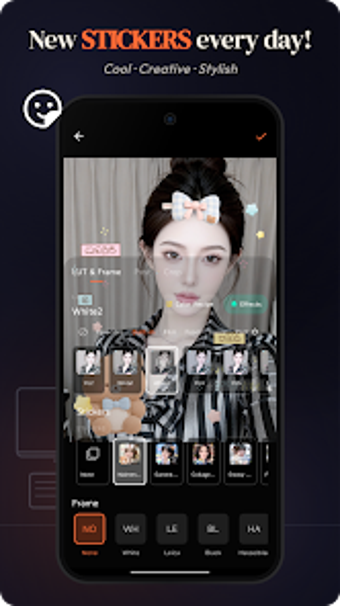
CoCoCamera- Filter & Sticker, from cococamera, is an Android photography app designed to move mobile shots toward polished editorial looks. It combines in-camera, AI-enhanced editing with live AR effects to let creators preview results while shooting. Key strengths include the app’s AI Color Match, custom LUT import, and a suite of specialized food and landscape filters. Mobile photographers, food bloggers, and social media creators gain fast control over consistent visual identity and on-device grading.

Unlock your creativity with Adobe Stock
Get 10 images or 1 video with a free trial
What is CoCoCamera used for?
The app serves as a bridge between casual capture and deliberate image styling, offering on-device tools that shape a final photograph without a desktop roundtrip. Its core purpose is to provide AI-assisted styling and compositional aids at capture, from real-time filter previews to AI Photo Rating that evaluates image quality. For creators who publish frequently, this tool reduces the number of editing steps between shoot and post by giving immediate, judgeable results.
How does it handle color and tonal control?
Color work centers on two concrete mechanisms:
- AI Color Match, which analyzes a reference image and generates a matching color profile;
- custom LUT import, which lets users apply and preserve a personal grading across images.
Those systems let photographers reproduce a specific aesthetic across shoots. Although this capability supports consistent branding, copying another image’s profile raises provenance and attribution questions creators should consider when referencing other photographers’ work.
Is the interface and workflow suitable for social creators?
The app emphasizes immediate visual decisions, with more than 60 specialized food and landscape filters and real-time shader previews that show results while composing. AR stickers run with AI-powered face tracking, so playful or editorial overlays stay aligned to subjects during capture. These live previews make the tool practical for quick social posts and photo-first workflows rather than lengthy studio retouching sessions.
How well does it perform on modern Android devices?
Performance relies on optimized rendering and device capability, with the developer targeting recent Samsung, Google, OnePlus, and Xiaomi hardware. High-resolution Live Photo capture and on-device AI Portrait Bokeh indicate substantial processing during capture and export. Creators using entry-level devices may not be able to run every advanced real-time effect at full fidelity, so a higher-performance device supports the app’s full creative range.
A focused mobile tool for creators seeking visual consistency
The app is a practical choice for mobile photographers and social creators who need predictable, repeatable looks and rapid in-camera decisions. It excels when you want consistent styling applied at capture and quick publishing readiness. Choose a desktop workflow when you require granular, multi-stage finishing that extends beyond on-device adjustments; the app best serves projects kept primarily on the device.